Your heart-rate zones and easy-effort ceiling are built from two numbers: LTHR (lactate-threshold heart rate) and max HR. MRD auto-detects both from your own run data and keeps them updated as your fitness changes. If you already know your real numbers — a lab test, a recent max effort, a sports doctor’s figure — and want to set them directly instead, the Heart-rate thresholds card on the Manage page lets you do that.
Go to the  Manage page, find the Heart-rate thresholds card, and enter your LTHR and Max HR in bpm. As you type, a preview shows what your five heart-rate zones would become. Press Save.
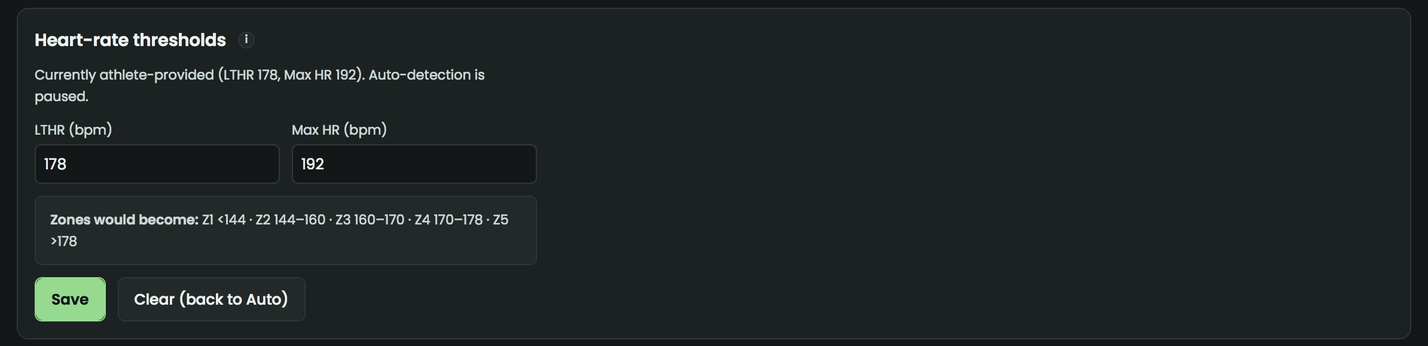
Setting these pins them as athlete-provided — auto-detection is paused and won’t quietly change them again. Your zones (and the easy-effort ceiling note on the Training Zones card) are recalculated from the new LTHR using the same formula the pipeline’s own auto-detection uses, so nothing else on the dashboard falls out of step.
Changed your mind, or think your numbers have moved on? Press Clear (back to Auto) and auto-detection picks up again from your own run data on the next pipeline run.
One thing worth knowing: heart rate is treated as a supporting signal on this dashboard, not the final word. Where you have power data (Stryd) or a confirmed race result, those take priority over heart rate for your fitness reading and predictions — HR lags effort by 30–60 seconds and can drift with sensor type, heat, and fatigue, so it’s the least trusted of the three when they disagree. Overriding your thresholds here changes your zones and HR-based readings; it doesn’t change that priority order elsewhere on the dashboard.
Full explanation: Training Zones & Race Readiness in the guide.